All-in-one Android workspace for tasks, notes, and projects
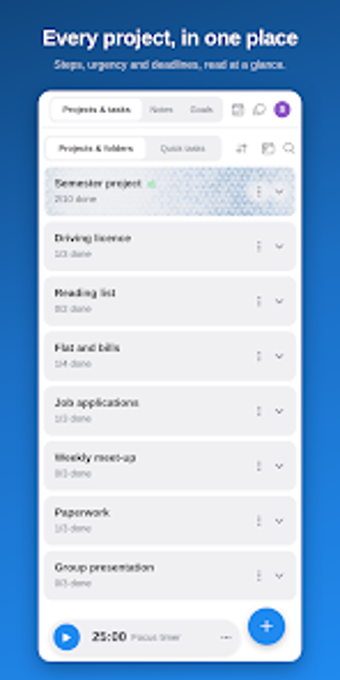
Combines task lists, rich notes, and project planning into a single workspace with numbered steps and urgency color coding to keep the next action visible. Idus: tasks notes projects, from Idus Tools, targets students, freelancers, and professionals who prefer a single app rather than multiple specialised tools. Key capabilities include a unified month calendar, cross-platform sync, and a built-in AI assistant for plan generation. It fits users managing several concurrent projects who want a minimal, ad-free interface.
Idus organizes work around explicit next steps
Idus bases projects on numbered steps and urgency-based colors (yellow, orange, red), which makes the workflow decision simple: each project shows the next logical move. The app combines task management and rich text notes so users can attach checklists, tables, and pinned items directly to project pages. This structure suits workflows that benefit from stepwise progression rather than scattered to-do lists.
Project output and scheduling suit multi-project users
The month calendar aggregates deadlines from all projects into one view and supports customizable reminders, so deadlines and milestones appear alongside daily tasks. Export options and a 30-day recycle bin provide file-level control for handoffs or audits. For people producing deliverables across several clients or courses, the calendar and data export let you produce and archive project records without switching tools.
Collaboration and AI assist teamwork but some features are gated
Projects can be shared with viewer or editor roles and open a group chat inside each project, which keeps communication contextual. The built-in @Idus assistant can generate plans, summarise notes, and convert pasted emails into tasks, simplifying project setup. The developer restricts access to the AI assistant, web and Windows clients, and project sharing behind a premium tier, so team features require an account upgrade to enable cross-device collaboration.
Interface philosophy reduces distractions, with offline resilience
The app adopts a minimalist, ad-free design with multiple aesthetic themes, aimed at lowering cognitive load during work sessions. Idus works offline and synchronises changes after reconnecting, which supports fieldwork or travel. On Android the app requires a modern OS for full feature support, so organisations using older devices may need hardware updates to use every function.
Best for individuals and small teams consolidating fragmented workflows
Idus suits students, freelancers, and small professional teams who want tasks, notes, and projects in one place and who prioritise a calm, distraction-free interface. Expect clear step-driven project control and offline reliability; accept that cross-device sharing and the AI assistant are gated behind an account tier. Choose Idus when you prefer a single workspace over maintaining multiple specialised apps.